




OCR PRINTED-TEXT READING

OCR Inspection
to Catch Unreadable or Wrong Printed Text

KOMPASS brings OCR inspection to every pack, part and label on the line. AI models read the printed text, even when print quality varies, check it against what should be there and send a result to the line controls before an unreadable or wrong code leaves the plant.

Discuss Your Text Reading

Trusted by manufacturers to improve quality on the line

THE PROBLEM

Text That Looks Fine at a Glance Can Still Be Wrong

Dates, codes and product text are printed thousands of times a shift. Without OCR inspection, inspectors can confirm that something is printed, but not read every character on every pack at line speed.

Faded and Broken Print Slips Through

A blocked nozzle or worn ribbon removes parts of characters. The code is still there, but a 3 now reads as an 8 to a customer or scanner.

Rule-Based Readers Need Perfect Print

Template OCR copes with crisp, fixed fonts. Smudges, skew and changing backgrounds push read failures up and operators start bypassing the check.

Wrong Text Is Found by the Customer

An illegible or incorrect date can trigger retailer rejections, withdrawals or complaints long after the batch has left the line.
The Solution

Read Every Character, Not Just Confirm Print Exists

Our AI Product Inspection system, KOMPASS™, brings AI-based OCR inspection to packs, parts and labels: models trained on your print read the text, then check it against the expected content. Each decision reaches the line controls with an image of the print.

Read Text That Template OCR Struggles With

  • Train OCR inspection on your own fonts, substrates and print variation
  • Read smudged, faint, skewed and partly broken characters
  • Handle inkjet, laser and thermal transfer print on the same platform
  • Flag low-confidence reads for review instead of guessing
Every character
Read, not sampled
Your print
Training from your own line
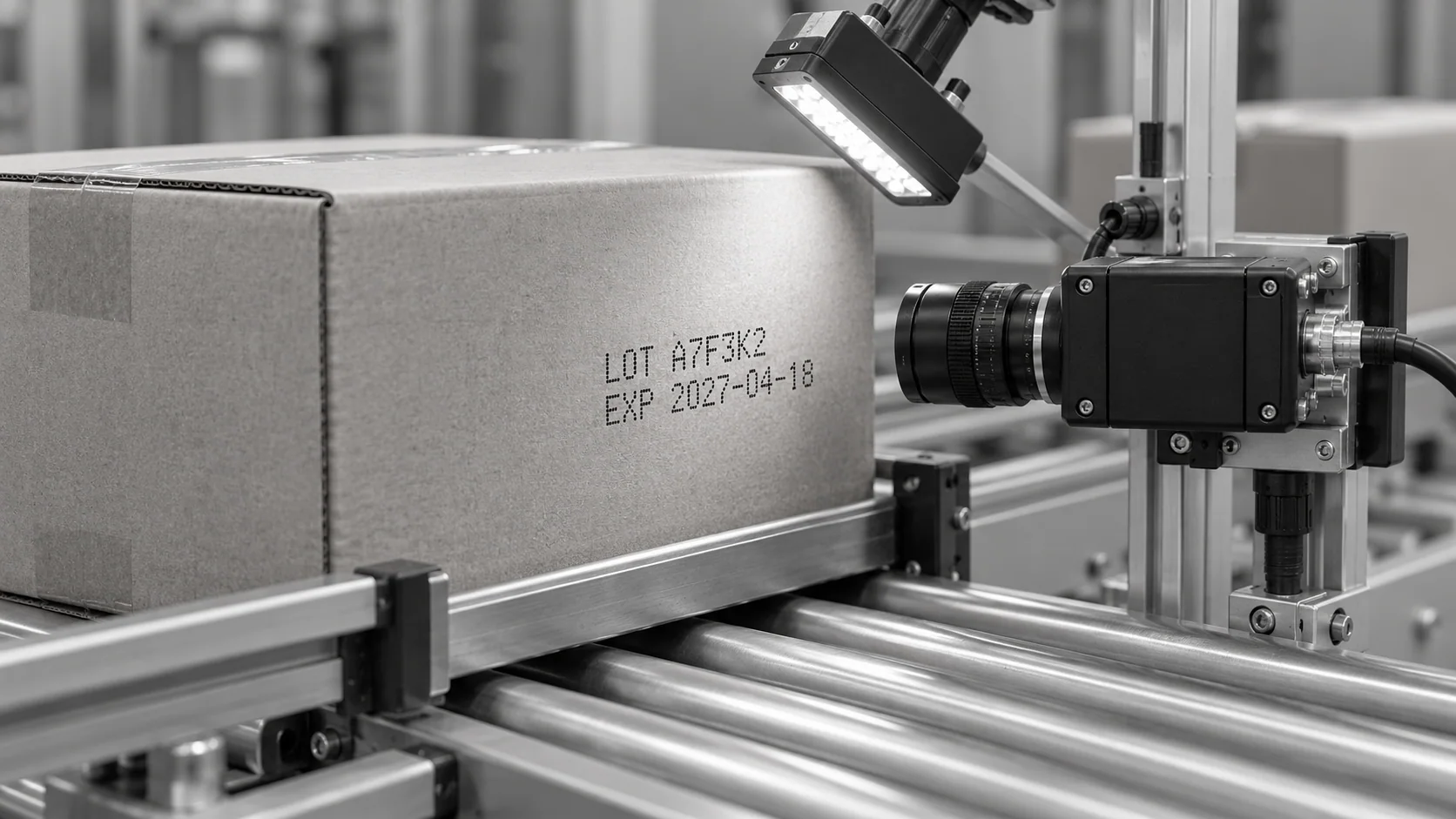
Conceptual illustration of a side-mounted camera facing an inkjet code on a carton.

Check the Reading Against What Should Be There

  • Compare each read with the expected text for the running product
  • Reject or hold packs with missing, wrong or unreadable text
  • Store every result with its image for traceability
  • Show read failures by printer and shift to find the cause
Expected vs read
Content checked, not just presence
Image evidence
Every failure reviewable
HOW IT WORKS

See KOMPASS Read and Verify Printed Codes

Jidoka's demonstration shows KOMPASS using AI-driven OCR to read batch codes, dates and serial numbers in real time. A print-synchronised trigger captures each pack, and mismatches or unreadable print can trigger automated rejection through the line PLC.

Official video frame showing two captured batch-code images with character-detection boxes
Batch-code application: KOMPASS captures printed codes and checks the characters against the expected information.
Highlight #1

Capture the Print at the Right Moment

A trigger tied to the printer or conveyor captures each item with the text in the same place. Lighting is set for the substrate and print method.

Highlight #2

Read Each Character

The model locates the text region and reads every character, including faint, smudged or skewed print that rule-based tools reject.

Highlight #3

Verify, Reject and Record

The reading is checked against the expected text. Failures are rejected or held, and each result is stored with its image.

Connect With Us

Send us examples of good, faint and wrong prints and the text that should appear. We will assess the imaging your OCR inspection needs.

Get In Touch

What Changes When Every Line of Text Is Read?

Each method needs a clear view of the print. The difference is how each copes with real print variation, and whether OCR inspection checks the content at all.

Inspection need
Manual inspection
Traditional machine vision
KOMPASS AI
Variable print quality
Readable to a person, slowly
Read failures rise as print degrades
Trained on your real print variation
Coverage
Spot checks at intervals
Every item, if print stays consistent
Every item, with low-confidence reads flagged
Checking content
Easy to miss a wrong digit
Works when fonts and layout are fixed
Reads and compares with the expected text
First-Time-Right
Depends on attention over a full shift
Stable while conditions stay ideal
Stops wrong or unreadable text before dispatch
CUSTOMER SUCCESS

Diageo Reads and Checks Label Text on Every Bottle

In Diageo's labelled-bottle line, KOMPASS reads label text and checks orientation and condition in-process, ejecting non-conforming bottles automatically.

Official Jidoka case-study cover for Diageo labelled-bottle inspection
Diageo Reads and Checks Label Text on Every Bottle
FMCG

Diageo's results cover its complete labelled-bottle inspection, where OCR inspection of label text is one part.

  • 99%+ accuracy in detecting label defects and text errors
  • Text checked in-process with automated ejection of failing bottles

Frequently Asked Questions

What can AI text reading handle that older tools cannot?

OCR inspection built on AI is trained with images of your own print, so it copes with smudges, faint characters, skew and busy backgrounds that break template matching. Deep learning OCR does not depend on perfect character segmentation, where each letter must be cleanly separated before it can be read. That matters on fast lines where print quality changes as printers warm up, ribbons wear and nozzles partially block. It also means new fonts or layouts are added by training with examples, not by rewriting rules.

Which print methods can it read?

The same platform reads continuous inkjet codes, laser-marked text, thermal transfer overprinting and printed labels. Each method looks different. Inkjet print is dot-based and can bleed on porous board, while ribbon-based print is crisp until the ribbon wears. Training includes the print methods and substrates you actually run, so the model learns what normal variation looks like for each one before it starts making decisions.

Does it only read, or does it also check the text?

Both. Industrial OCR returns the characters it reads, and KOMPASS then compares them with the expected string for the running product, such as a date, batch code or product name. A pack fails if the text is missing, unreadable or different from what should be printed. The comparison can come from a recipe, the printer or a line system, so changeovers update it automatically.

Can it keep up with fast lines?

Yes, when the trigger, exposure and lighting suit the line. Expiry dates are one of the most common applications because a wrong or illegible date causes retailer rejections. On packaging lines the camera must capture each item with enough light and a short exposure to avoid blur. Throughput is confirmed against the full station cycle, including rejection, rather than reading speed alone.

How do you measure whether reading is reliable?

Track the read rate, the share of items read correctly, together with false rejects and missed errors on a labelled set that represents production. Include faint, smudged and deliberately wrong prints. Test across shifts, printers and substrates, then repeat after any change to the printer or packaging. Low-confidence reads should go to review rather than being forced into a pass or fail decision. Agree the acceptance targets before go-live so everyone judges the station against the same numbers.

Why do some codes fail even when they look readable?

Low print contrast is a common cause. Dark ink on a dark or patterned background, or faint print on a glossy surface, can leave characters that a person reads with effort but a camera barely separates from the background. Lighting angle, colour and polarisation are adjusted during the trial. Where contrast is too low for any reliable reading, the result also tells you the printer needs attention.

What happens when the text is wrong?

The station sends the configured response to the line, such as a reject, a hold or a stop after repeated failures. Each failure is stored with its image, the text read and the text expected. Reviewing those images shows whether the cause is the printer, the packaging material or the data sent to the printer, which shortens the time needed to correct the problem. Repeated failures from one printer can also stop the line before a whole pallet is affected.

What should we send to scope OCR inspection for our line?

Send samples of good prints, faint and smudged prints and known wrong codes, along with the text that should appear and how it changes between products. Add the line speed, packaging materials and where a reject can happen. With that, we can assess lighting, camera position and training needs, and recommend how OCR machine vision should check printed text on your line.

CONNECT WITH OUR EXPERTS

Show Us the Text Your Current Check Cannot Read

Share your print samples, the text that should appear, your materials and line speed. We will scope OCR inspection for your checkpoint and explain timing and cost. KOMPASS deployments generally take 6 to 8 weeks.

Discuss Your Text Reading
Close video